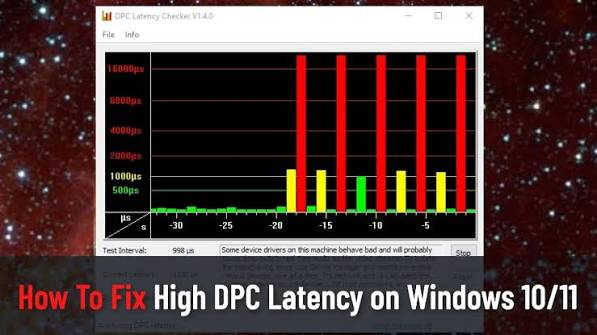

A computer can sometimes experience unexpected delays even when its hardware appears to be working properly. Audio may crackle, applications can briefly freeze, or games may show occasional stuttering. One factor that can be investigated in these situations is DPC latency. DPC Latency Checker provides a useful resource for understanding latency and learning more about potential Windows performance problems.
What Is DPC Latency?
DPC Latency Checker is focused on Windows latency and related system-performance topics. DPC stands for Deferred Procedure Call, which is part of how Windows manages certain operations requested by hardware and drivers.
When a driver or hardware component takes longer than expected to complete an operation, other processes may have to wait. Under certain circumstances, these delays can become noticeable during real-time tasks.
Understanding this concept can help users investigate performance problems more effectively.
Why Latency Can Matter
Low and consistent latency can be particularly important when a computer needs to process information continuously. Audio recording is a good example because sound data must be processed without significant interruptions.
High or inconsistent delays may contribute to symptoms such as audio dropouts, crackling, or short interruptions. Similar issues can sometimes appear during gaming, streaming, or other demanding activities.
However, latency should not automatically be blamed for every performance problem. A proper investigation should consider other possible causes as well.
Common Driver-Related Problems
Drivers provide the connection between Windows and hardware devices. If a driver is outdated, incompatible, or experiencing an error, it can potentially affect system responsiveness.
Audio devices, graphics hardware, network adapters, storage controllers, and other components all depend on drivers.
When investigating a latency problem, it can be helpful to think about recent driver changes. A newly installed or updated driver may provide an important clue if the problem started around the same time.
DPC Latency and Audio Production
Audio professionals often pay close attention to system latency because recording and playback require reliable real-time processing.
If the computer cannot handle audio data consistently, users may hear clicks, pops, or dropouts. These interruptions can make music production, podcast recording, voice work, and live monitoring more difficult.
Latency testing can be included as part of an audio troubleshooting routine. Users can also review audio drivers, interface settings, background applications, and system resources.
DPC Latency for Gamers
Gaming performance depends on numerous factors, including processor load, graphics performance, drivers, temperatures, game settings, and network quality.
When a game suddenly stutters or the system behaves inconsistently, DPC latency may be one area worth examining. Identifying driver or system interruptions can help users narrow down potential causes.
Still, users should avoid assuming that latency is responsible for every gaming issue. A broader performance check is usually more reliable.
Background Applications
Programs running in the background can consume system resources and interact with hardware. Antivirus software, monitoring tools, update services, and manufacturer utilities may all operate while other applications are being used.
If latency or stuttering is suspected, users can review unnecessary background processes and determine whether they can be closed during demanding activities.
Testing changes individually is recommended because it makes it easier to determine whether a particular application is affecting performance.
Keeping Your System Updated
Regular maintenance can contribute to a more stable Windows environment. Keeping the operating system and important device drivers properly maintained can help address compatibility and performance problems.
At the same time, users should pay attention to when problems begin. If an issue appears immediately after a driver or software update, the recent change may be worth investigating.
Recording system changes can make future troubleshooting much simpler.
How to Troubleshoot Latency
A step-by-step process can make it easier to identify the source of a problem. Start by describing the exact symptom. For example, determine whether the issue only occurs during audio recording, gaming, streaming, or general computer use.
Next, consider recent changes to the system. Check whether new hardware, drivers, applications, or updates were installed.
Then use appropriate diagnostic tools and information to investigate the system. If a potential cause is identified, change one thing at a time and test the results.
This method reduces confusion and helps establish a clearer connection between a change and the computer’s behavior.
Other Causes of Performance Problems
DPC latency is not the only reason a computer may stutter or become unresponsive. Overheating, insufficient RAM, storage problems, software conflicts, graphics settings, and hardware limitations can produce similar symptoms.
Network issues can also cause delays in online games and streaming applications. Therefore, users should evaluate all relevant parts of their system before deciding what is responsible.
A combination of latency testing and general system diagnostics can provide a more complete understanding.
Improving Overall System Stability
Maintaining a clean and well-managed system can help users avoid many unnecessary performance problems. Unused software can be removed, important updates can be monitored, and resource usage can be checked when problems occur.
It is also useful to monitor CPU usage, memory consumption, temperatures, and storage performance. These measurements can reveal problems that may otherwise be difficult to notice.
If an issue happens repeatedly, keeping a record of when it occurs can help reveal a pattern.
Conclusion
DPC latency is an important concept for Windows users who depend on consistent system performance. It can be especially relevant to audio production, gaming, streaming, and other activities where interruptions can be noticeable.
DPC Latency Checker offers a useful starting point for understanding latency and investigating possible performance issues. By examining drivers, background applications, hardware, and overall system behavior, users can narrow down potential causes of unwanted interruptions.
Rather than making several changes at once, a systematic approach is usually more effective. Identifying symptoms, reviewing recent changes, testing possible causes individually, and checking the wider system can help users work toward a smoother and more reliable Windows experience.